Details
The Feedback section connects you directly to our support team. Report bugs, request features, or get help with any platform questions.
Getting Support When You Need It
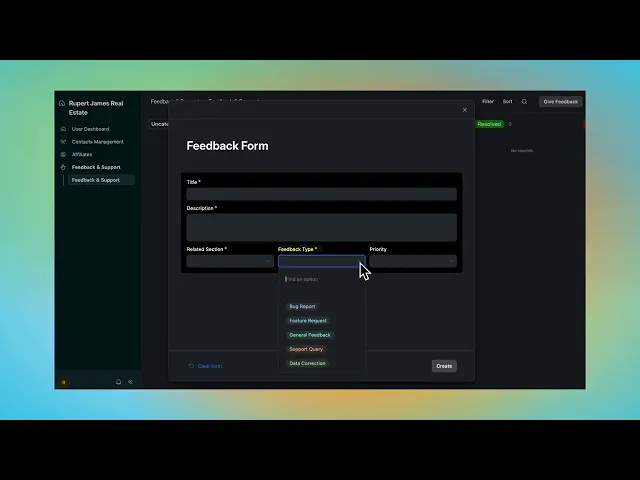
Navigate to Feedback and click Create Request. Fill in the form with your issue title, detailed description, and select the relevant platform section (Listings, Deals, Profile, etc.). Choose request type—Bug Report for technical issues, Feature Request for improvements you'd like to see, Support Query for general help, or Data Correction if information needs updating.
Set priority level based on urgency. Critical issues (platform down, data loss) get immediate attention. High priority covers functionality problems affecting your workflow. Medium and low priority handle enhancement requests and general questions.
Once submitted, your ticket appears in the Feedback dashboard with status tracking. See whether it's under review, in progress, or resolved. Our technical team responds directly through the platform, and you'll get email notifications when there's an update. Full ticket history stays accessible so you can reference past issues or see how previous problems were resolved.
WHAT'S INCLUDED:
Direct Support Access - Submit requests without leaving the platform
Ticket Status Tracking - See exactly where your request stands
Priority Levels - Flag urgent issues for immediate attention
Request Type Categories - Bug reports, feature requests, support queries, data corrections
Full Ticket History - Access all past submissions and resolutions